Play Wolfenstein 3D in Your Browser
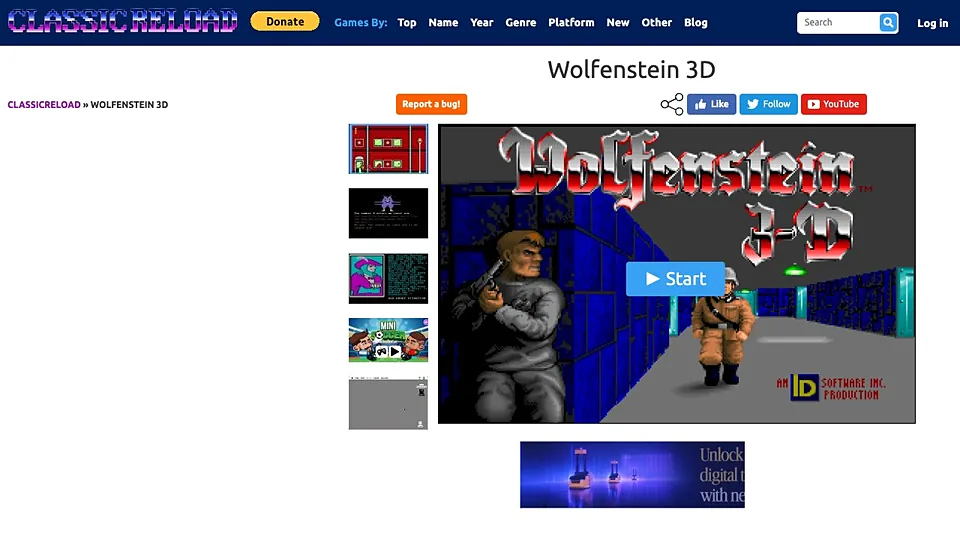
Wolfenstein 3D is the 1992 id Software shooter that started the first person genre, and this page emulates the DOS original in a browser tab through classicreload. There is no install and no emulator to configure. We link out to that project and do not host the game.
Advertisement
What is Wolfenstein 3D?
Released in 1992 by id Software with Apogee handling distribution, Wolfenstein 3D put you behind enemy lines in a castle full of guards, dogs and treasure. Its shareware episode spread widely at the time, which is a large part of why the game is still easy to find today. Nothing about this browser version changes the game itself.
The page works by running a DOS environment inside the browser, so what you see is the original executable drawing its own graphics rather than a rewrite. Startup can take a moment while that environment boots, and the window often starts small. Sound works if the emulator has it enabled, and keyboard focus inside the canvas is what makes the controls respond.
Some emulated pages also expose touch buttons so a phone can play, though a game built around arrow keys and a fire key is never going to feel natural under a thumb. Saving is usually handled by browser storage or save states inside the emulator, and clearing site data can remove progress.
How to play Wolfenstein 3D in your browser
- Visit the Wolfenstein 3D page and let the DOS emulator boot
- Click inside the game window so it captures your keyboard
- Press the start key at the title screen and pick a difficulty
- Move with the arrow keys and hold run to cross rooms quickly
- Press the use key at brown doors to open them and find the exit
- Clear each floor, then take the elevator up to the next one
Controls
| Input | Action |
|---|---|
| Arrow up / down | Walk forward and backward |
| Arrow left / right | Turn the view |
| Ctrl | Fire the equipped weapon |
| Space | Open doors, push walls and use elevators |
| Shift | Run while held |
| Alt + left / right arrow | Strafe sideways without turning |
| 1 to 4 | Switch between knife, pistol, machine gun and chaingun |
Controls can differ between builds. Most of these games let you rebind keys from their own settings menu, and you can press Esc to release the mouse pointer.
Tips for Wolfenstein 3D
- Hold run through open corridors, standing still in a doorway makes you an easy target for guards.
- Listen for the guard alert sound before entering a room, the noise tells you how many are awake.
- Check side walls for push panels, secret rooms hold treasure, extra ammo and health.
- Keep the chaingun for crowded rooms and use the knife on dogs to save ammunition.
- Press the use key on every suspicious wall, the push-wall secrets are easy to walk past.
- Turn the emulator's sound on if you can, the audio cues warn you about enemies behind you.
Screenshots
Wolfenstein 3D FAQ
Can I play Wolfenstein 3D for free in a browser?
The page is open and no payment is requested. The freely distributed shareware episode is the usual content in browser builds, and we link to the project that serves it rather than hosting the files ourselves.
Is this the official Wolfenstein 3D from id Software?
The game is the genuine 1992 id Software release running under emulation, but the page hosting it is a third party archive site, not Bethesda or id. Treat it as an unofficial way to play the original rather than a supported store version.
Does Wolfenstein 3D work on a phone?
It can, when the site shows touch controls for the emulator, though the original expects arrow keys and a separate fire button. Short sessions are fine, but aiming and strafing at the same time is clumsy on glass.
Why is the Wolfenstein 3D page not responding to my keys?
The emulator only listens once the canvas has focus, so click inside the game window first. If that fails, check that no script blocker is stopping the emulator from starting, then reload the page and try again.
Can I use a controller to play Wolfenstein 3D on the web?
Not through the emulator itself, which maps the original keyboard layout. Some emulator front ends offer gamepad remapping, but the arrow key scheme with a separate fire key is what the game was designed around.
Does the browser version save my progress?
Emulated pages usually store save states in the browser, so progress survives a refresh on the same device. It will not follow you to another computer, and clearing cookies or site data for the page removes those saves.
Games like Wolfenstein 3D
Same genre, same energy, also playable in a tab.